Farmer ID to PVC Tool
Prepare your existing Farmer Registry record for personal PVC printing. Arrange information, preview both sides, and export print-ready CR-80 cards locally. Not an official Farmer ID download or issuance service.
Select or Drop Farmer Registration Form / Certificate
Supports official State Farmer Registry & AgriStack Registration Form / Certificate PDF
Prepare Your Existing Farmer ID for Personal PVC Printing
Printing an existing Farmer Registry ID Card as a durable plastic Smart Card has never been simpler. Designed specifically for CSC (Common Service Centre) operators, cyber cafe professionals, and farmers across India, our Farmer ID to PVC Tool arranges your existing registry details into the exact international CR-80 PVC standard (85.60 mm × 53.98 mm) at 300 and 600 DPI.
Whether you need a dual-card PDF layout with cutting ticks, a ready-to-print A4 sheet for inkjet photo paper, or individual high-definition Front and Back image files for direct PVC tray printing, this tool automates pixel-exact sizing while preserving strict data privacy.
100% Private, Client-Side Browser Execution
All photo extraction, XML QR synthesis, typography alignment, and high-definition card rendering happen entirely inside your local browser memory. No farmer identity records, Aadhaar numbers, photographs, or personal details are uploaded to external servers or logged.
Visual Preview: Standard CR-80 PVC Smart Card Output
Below is an authentic visual demonstration of the final Farmer Registry ID Smart Card generated by our tool. Calibrated to the exact international ISO CR-80 standard (85.60 mm × 53.98 mm) at 300 and 600 DPI, the layout is print-ready for direct PVC card tray printers, thermal badge machines, or inkjet lamination sheets.
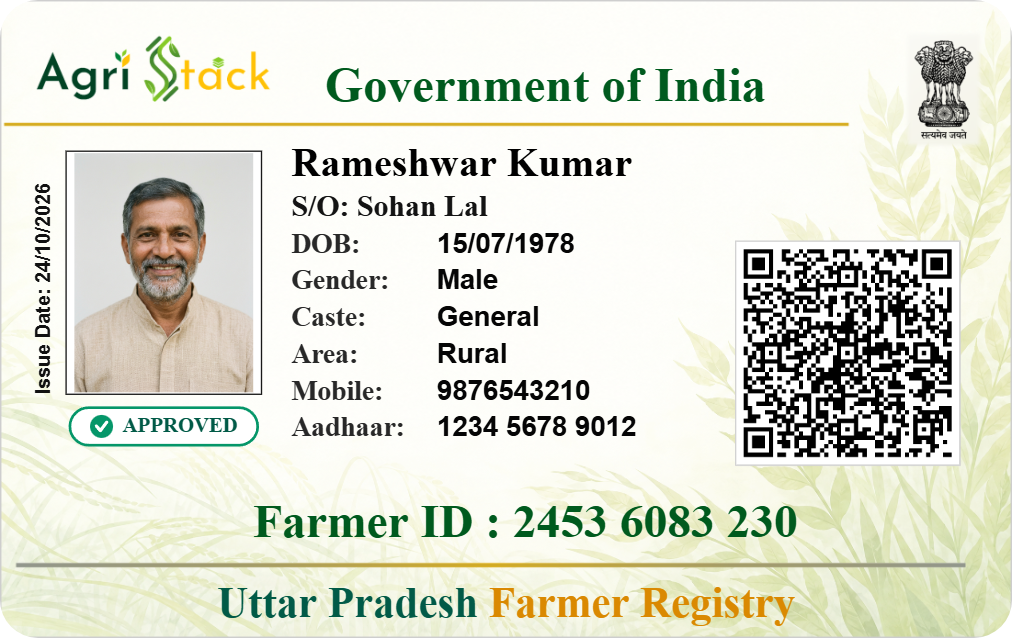
- Cardholder Portrait: 35 × 45 mm scaled photo with high-contrast border
- Verified APPROVED Badge: Official registry verification status badge
- AgriStack QR Code: High-density XML barcode for instant offline validation
- Registry Credentials: 11-digit formatted Farmer ID with dual-tone State title
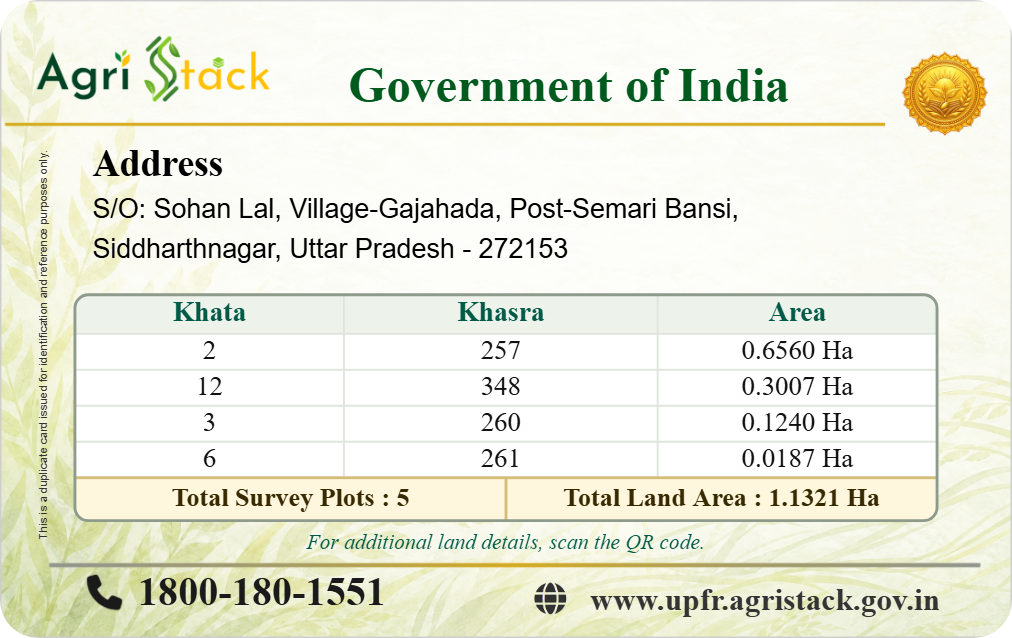
- Residential Address: Multi-line wrapped village, district, state & PIN
- Land Details Table: Khata, Khasra, Area with Total Plots & Land Area summary
- Helpline & Portal: Kisan Call Centre (1800-180-1551) & official state portal URL
Step-by-Step: How to Use the Farmer ID Print Tool
Follow these 4 simple steps to prepare your existing Farmer Registry card for PVC printing:
Upload Farmer Registration Form (or Enter Manually)
Upload your official Farmer Registration Form / Certificate PDF to automatically extract your personal information, address, land records, and cardholder photograph. Alternatively, click Enter Details Manually to type your information directly.
Review Details & Enter 11-Digit Farmer ID
Inspect the extracted values, select your State Registry, and enter your official 11-digit Farmer Registry ID. The tool enforces strict numeric formatting and state Title Case normalization.
Inspect Side-by-Side Dual Card Preview
Click Preview Card to view high-resolution Front and Back card previews side-by-side in standard CR-80 aspect ratio. Check typography, photo placement, and the official AgriStack verification QR code.
Export at Actual Size (Direct Downloads)
Download directly in your preferred print format: an Official PDF Document (dual cards on a landscape sheet), an A4 Print Layout (with cutting guidelines for photo paper), or Separate PVC Images (Front & Back PNG/JPG files for PVC card tray printers).
Official State Farmer Registry Portals (AgriStack)
This website is an independent private print layout utility and does NOT register farmers, issue official Farmer IDs, or download government records. If you need to register, complete e-KYC, or retrieve your official Farmer Registry document, please use your state's official AgriStack portal below:
Always verify official URLs ending in .gov.in before providing sensitive identification or agricultural credentials.
Farmer ID PVC Card Dimensions & Print Calibration
Our tool strictly follows the ISO/IEC 7810 ID-1 standard (commonly known as CR-80), matching standard debit cards, PAN cards, and PVC Aadhaar cards. Below are the measured technical specifications:
| Property | Standard Specification | Pixel Dimensions (300 DPI) | Pixel Dimensions (600 DPI) |
|---|---|---|---|
| Card Width | 85.60 mm (3.370 inches) | 1012 px | 2024 px |
| Card Height | 53.98 mm (2.125 inches) | 638 px | 1276 px |
| Corner Radius | 3.18 mm rounded corner | CR-80 Standard | CR-80 Standard |
| Aspect Ratio | 1.5858 : 1 (Exact CR-80) | 1012 / 638 | 2024 / 1276 |
| DPI Metadata | Calibrated PNG pHYs Chunk | 11,811 pixels / meter | 23,622 pixels / meter |
Printer Settings for Exact Sizing
- For PVC Card Tray Printing (Epson L805 / L850 / Canon / Brother): Use the separate Front and Back PNG/JPG files downloaded via Download PVC Images. Load your plastic CR-80 cards into the dedicated PVC tray, select "PVC Card" or "CD/DVD Tray" in printer media settings, and print at 100% Scale with High Quality mode.
- For A4 Photo Paper / PVC Dragon Sheet: Download the A4 Print Layout. In your printer dialog, ensure Actual Size or Scale: 100% is selected. Never select "Fit to Page", "Shrink to Printable Area", or auto-scale, which shrinks cards and invalidates the physical CR-80 size.
Data Privacy Architecture: Zero Server Retention
We believe farmer and citizen identification data must remain completely private. Our technical architecture is designed from the ground up for strict confidentiality:
- Client-Side PDF Processing: PDF extraction is performed locally using Mozilla's WebAssembly-powered
pdf.jsengine running in browser memory. - No Server Uploads: Files, names, Aadhaar numbers, mobile numbers, and photos are never sent to external servers or third-party APIs.
- Zero Server Logging: No web server logs or database entries record your personal agriculture details.
- Volatile Memory Hygiene: Once card generation is completed and the browser tab is closed, all allocated image buffers and data URLs are immediately cleared from memory.
Troubleshooting Common Print & Layout Issues
Printed Card Size is Incorrect
Check your printer software or PDF reader dialog. Make sure scaling is set to 100% (Actual Size). Disable any option labeled "Fit to Printable Margin" or "Shrink Oversized Pages".
Card Edges or Text Cut Off
Our card template includes calibrated safe-margin zones. Ensure your printer paper feed is aligned with no paper skew. On PVC trays, ensure the card is seated flush in the tray recess.
Blurry Photograph or Text
In the Output Customization options, select 600 DPI (High Definition) before downloading. This doubles resolution to 2024×1276 pixels for crystal-clear microtext.
QR Code Not Scanning
The QR code is generated using authentic AgriStack XML schema. Ensure your print quality is set to "High" or "Best Photo" so the QR dots remain sharp and distinct.
Frequently Asked Questions
Everything you need to know about the Farmer ID PVC Print Layout Tool, dimensions, and settings.
The Farmer ID to PVC Tool is a private, client-side print layout utility that arranges your existing Farmer Registry details into the standard CR-80 plastic card format (85.60 × 53.98 mm) at 300 or 600 DPI. It is designed to prepare cards for printing on PVC card trays or A4 sheets. It does NOT register farmers or issue official Farmer IDs.
No. This tool is a third-party print preparation utility and cannot issue, verify, or download official records from government servers. To register or download your official Farmer ID PDF, please visit your state's official AgriStack registry portal (such as Maharashtra mhfr.agristack.gov.in or Bihar bhfr.agristack.gov.in).
When you upload an official State Farmer Registry or AgriStack Registration Form / Certificate PDF, the tool automatically extracts personal details (name, guardian relation, DOB, gender, caste, address, and photograph) as well as land records (Khata, Khasra, and Land Area) directly in your browser memory with 100% privacy. You can review, update your current address if outdated, and generate your print-ready card immediately.
The card conforms to ISO/IEC 7810 ID-1 (CR-80 standard): 85.60 mm wide by 53.98 mm high (3.370 × 2.125 inches) with a 3.18 mm corner radius. At standard 300 DPI, each card is 1012 × 638 pixels. At 600 DPI (High Definition), each card is 2024 × 1276 pixels with calibrated pHYs metadata.
Yes! Clicking 'Download PVC Images' downloads separate high-resolution Front and Back PNG/JPG files with a short pause between them. No ZIP archive is used, allowing instant drag-and-drop into PVC printer software.
When printing the A4 Print Layout, open your printer dialog and choose '100% Scale' or 'Actual Size'. Never select 'Fit to Page' or 'Shrink to Printable Area', as this alters the physical card dimensions.
Yes, 100%. All PDF parsing, image cropping, QR code synthesis, and canvas rendering happen entirely inside your local browser memory. Zero personal details, files, or photos are transmitted to external servers or logged.
You can click 'Enter Details Manually' at any time. This reveals the complete form allowing you to type in the required information, upload a custom passport-size photo, and generate print-ready cards immediately.